

Search as you type
Type "golden carrot" or even "how to tame a cat". The right page shows up before you finish typing. Press Enter to open it.
The Minecraft Wiki app for your PC
BlockPedia puts the whole Minecraft Wiki, the best mods, every game version and your favorite YouTubers in one app. Stuck in the middle of a game? Press Ctrl+Shift+Alt+W and the answer pops up. Press it again and you're back in your world.
See what's inside
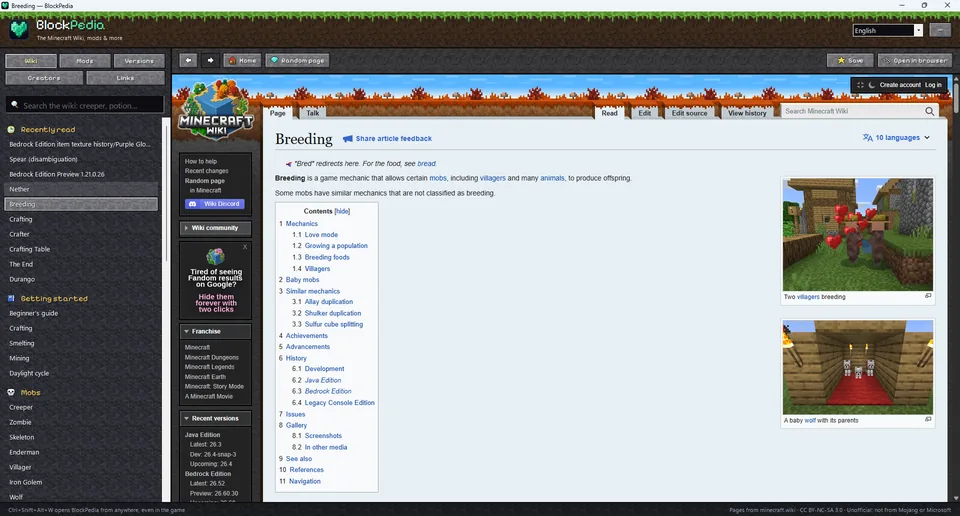
 Breeding — BlockPedia
 No account needed
 Java & Bedrock
 11 languages
 Installs in one click
Every Minecraft player has been there. You're halfway through a build, and suddenly you need to know something.
BlockPedia answers all of them, without leaving your game.
This is how fast BlockPedia finds things. Type anything: a mob, a block, an item, even a question.
Results come live from the Minecraft Wiki. In BlockPedia this page opens instantly, right inside the app, even on top of your game.
Get BlockPediaYour secret weapon
BlockPedia waits in the tray. Press the shortcut while you play and it jumps in front of your game. Press it again and you're back to mining. No menus, no browser tabs, no losing your place.
Try it! Press Ctrl+Shift+Alt+W on your keyboard now.
You can change the shortcut in the menu, and BlockPedia can start with Windows so it's always ready.
Or tap the keys
Your inventory
Nine tools in one app. Hover a slot to see what it does.
Type "golden carrot" or even "how to tame a cat". The right page shows up before you finish typing. Press Enter to open it.

Full wiki pages, with pictures and crafting tables, inside the app. No browser tabs, no mess.
The most downloaded, newest and trending mods, modpacks, shaders, resource packs, data packs and plugins from Modrinth.

The latest release and snapshot from Mojang's official list, and what changed in every version since.

The biggest Minecraft creators from all over the world, ranked by subscribers. Watch their channels inside the app.

Prism, Modrinth App, CurseForge, ATLauncher, MultiMC, the official Discord, Feedback and the bug tracker. One click each.

Save pages with Ctrl+D, jump back to what you read, or hit Random page and discover something new.
11 wiki languages. One choice changes everything: the wiki, the creators list and the app itself.
Made for both editions, so it helps you and every friend you play with.
Take a look inside
Real screenshots from the app. Click a tab to look around, click the picture to see it bigger.
Search as you type, read every page with its pictures and tables, and keep a list of what you read recently. Popular pages for mobs, blocks and gameplay are always one click away.
Browse the most downloaded, most followed, newest and recently updated mods, modpacks, shaders and resource packs on Modrinth, with search.
See the newest mods the moment they come out, and open their pages right inside the app to check versions and screenshots.
The latest Java Edition release and snapshot, straight from Mojang's official list. Click any version to see everything that changed.
100+ creators from around the world, ranked by subscribers. Show every language or only yours, and open channels inside the app.
How it works
Click the big green button. The installer is about 49 MB.
No admin password, nothing to set up. Everything it needs is included, and BlockPedia opens by itself.

Launch Minecraft, and whenever you need an answer, press Ctrl+Shift+Alt+W.
The first time you open it, BlockPedia follows your Windows language. Switch any time from the top of the app.
For parents
BlockPedia is a reading tool. It shows the community Minecraft Wiki and other Minecraft sites in one tidy window, so your kids can look things up quickly instead of searching the open web.
No account, no sign-upThere's nothing to register. Just install and use it.
Installs safely for one userNo admin rights needed. It installs only for the current Windows user, like a regular app.
Clean uninstallRemove it from Windows Settings > Apps. It also removes its settings, page cache and the "Start with Windows" entry.
Honest about the webPages come live from minecraft.wiki, Modrinth and YouTube. Those are third-party websites and may show their own ads or comments. Links to other sites open in your normal browser.
BlockPedia is not an official Minecraft product and is not approved by or associated with Mojang or Microsoft.
Questions
Yes. Download it, install it and use it. No account and no payment needed.
Yes. The Minecraft Wiki covers both Java and Bedrock Edition, so BlockPedia helps whichever edition you play. The Versions tab lists Java Edition versions.
That's what it's made for. Press Ctrl+Shift+Alt+W and BlockPedia jumps in front of your game. Press it again to go back. Tip: playing in windowed or borderless mode makes switching even smoother.
BlockPedia shows the real community Minecraft Wiki (minecraft.wiki) live, in its own window. The app itself is not an official Minecraft product and is not associated with Mojang or Microsoft.
Yes. Pages, mods and versions are loaded live, so you always get the newest information.
Windows 10 and Windows 11 PCs. There's no Mac, Linux or phone version yet.
That message can appear for new apps that Windows hasn't seen many times yet. Click "More info" and then "Run anyway". If you're not sure, ask a parent to check it with you.
Open Windows Settings > Apps, find BlockPedia and click Uninstall. Everything it saved is removed too.
Join the players who never get stuck. Download BlockPedia and press one key for every answer.
Know someone who plays Minecraft? Send them BlockPedia.


